Recipes
A recipe is a TOML file with everything about one kind of table: its pages, the engines, how numbers are cleaned, how a line becomes cells, and which totals must add up. Make one once and reuse it on next year’s report.
Every section is optional. A missing setting keeps the default, as extract does without a recipe. Command-line options (--pages, --engines, …) override the recipe.
Make a recipe
recipe new asks about the pages, the parser and the totals, tries the answers on a sample, and saves a commented TOML file. Here it runs on the Crime in India fixture; each answer follows its question:
pdfexorcist recipe new tests/fixtures/cii/cii_2021_1A.1_p43.pdf -o cii.toml
Which pages hold the table? (e.g. 3-5) (all): 1
Is this a scan or a photo (read it with OCR engines)? [y/n] (n): n

How page 1 reads (the first lines with numbers):
 Label                   ┃ Values
━━━━━━━━━━━━━━━━━━━━━━━━━╇━━━━━━━━━━━━━━━━━━━━━━━━━━━━━━━━━━━━━━━━━━━━━
 Population Crimes (IPC) │ (2021)
 (in Lakhs)              │ (2021)
                         │ (2021)
 1 Andhra Pradesh        │ 119229  188997  179611  528.5  339.9  92.9
 2 Arunachal Pradesh     │ 2590  2244  2626  15.4  170.9  51.7
...
How should values be placed? [rows/columns] (rows): rows
Skip lines with fewer than how many values? (titles, footnotes) (2): 3
A short name for this recipe (cii 2021 1A.1 p43): Crime in India 1A.1

Trying the recipe on page 1 of cii_2021_1A.1_p43.pdf ...
234 values agreed, 0 cells unresolved.
First rows of the result (blank = engines disagreed)
...
Should some values add up to a total (e.g. T = M + F, or States = All India)? [y/n] (n): y
Is the total a row (below or above its parts) or a column (beside them)? [row/column] (row): row
Label of the total row, exactly as printed (TOTAL ALL INDIA): TOTAL ALL INDIA
Labels of the rows that add up to it, separated by + (Enter: all the other rows): TOTAL STATE(S) + TOTAL UT(S)
Must the total equal the sum (=), or be at least the sum (>=)? [=/>=] (=): =
Add another total? [y/n] (n): n
9 values break a rule on the sample pages (marked in the failed column when you run it).
Save the recipe to cii.toml? [y/n] (y): y

Saved cii.toml. Next:
  run it:      pdfexorcist extract tests/fixtures/cii/cii_2021_1A.1_p43.pdf --recipe cii.toml
  read it:     pdfexorcist recipe show cii.toml
  edit it in any text editor; every line is commented.
It asks about cleaning only when the sample shows something to clean; this page has no commas or footnote marks. The saved file, without its comments:
name = "Crime in India 1A.1"
sample = "tests/fixtures/cii/cii_2021_1A.1_p43.pdf"

[pages]
select = "1"

[engines]
ocr = false

[normalize]
remove_commas = false
remove_footnote_marks = false
raised_dots = false
minus_signs = false

[parser]
type = "rows"
min_values = 3

[[checks]]
column = "label"
rule = "TOTAL ALL INDIA = TOTAL STATE(S) + TOTAL UT(S)"
by = ["page", "col"]

[output]
layout = "table"
format = "csv"
The values that break the rule are in columns 3 to 5: population is rounded and rates do not add up. Command line shows that run. Edit the file to fix it, then check it:
pdfexorcist recipe check cii.toml          # names the line of any mistake
pdfexorcist extract next_year.pdf --recipe cii.toml
recipe new --yes with options answers the questions from a script; see recipe new.
Example: a text table
examples/crime_in_india.toml is that recipe, edited: where limits the first rule to the count columns (0-2), a second rule says no row exceeds All India, and [normalize] removes commas and footnote marks. This page prints neither, so [normalize] changes nothing here; on a page that prints 1,020 it keeps the sums checkable.
name = "Crime in India: State/UT table"
description = "Cases by State/UT (columns 0-2: three years), population, rate, charge-sheeting"
sample = "../tests/fixtures/cii/cii_2021_1A.1_p43.pdf"

[engines]
ocr = false  # the PDF has a text layer: the five default engines read it exactly

[normalize]
remove_commas = true          # "1,020" -> "1020", so sums can be checked
remove_footnote_marks = true  # "490+" -> "490"

[parser]
type = "rows"   # a label, then its values in reading order
min_values = 3  # skip titles and footnotes, which carry one or two numbers

[[checks]]
column = "label"   # totals and parts are rows, named by their label
rule = "TOTAL ALL INDIA = TOTAL STATE(S) + TOTAL UT(S)"
by = ["page", "col"]  # checked separately in each column of each page
where = "col <= 2"

[[checks]]
column = "label"
rule = "TOTAL ALL INDIA >= rest"  # no row may exceed the national total
by = ["page", "col"]
where = "col <= 2 and label != 'TOTAL STATE(S)' and label != 'TOTAL UT(S)'"

[output]
layout = "table"  # one row per State/UT, one column per value
format = "csv"
pdfexorcist extract tests/fixtures/cii/cii_2021_1A.1_p43.pdf --recipe examples/crime_in_india.toml -o cii.csv
Agreed          234  100.0% of cells
Unresolved        0
Checks      2 rules  all passed

Wrote cii.csv (table layout, 39 rows).
page,label,0,1,2,3,4,5
1,1 Andhra Pradesh,119229,188997,179611,528.5,339.9,92.9
1,2 Arunachal Pradesh,2590,2244,2626,15.4,170.9,51.7
...
1,TOTAL UT(S),329100,285150,327087,388.1,842.7,36.7
1,TOTAL ALL INDIA,3225597,4254356,3663360,13671.8,268.0,72.3
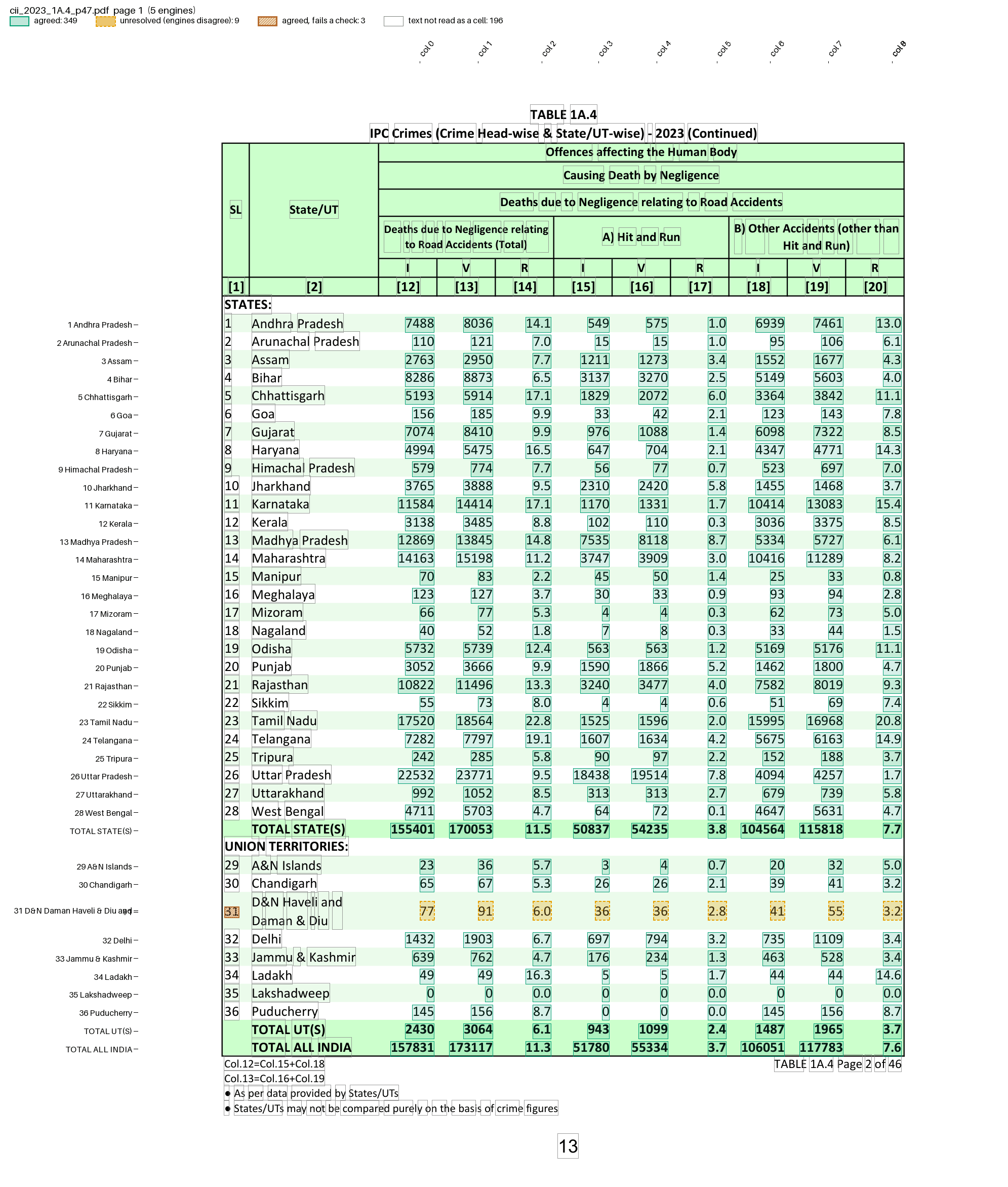
pdfexorcist show tests/fixtures/cii/cii_2023_1A.4_p47.pdf --recipe examples/settings/cii_rows.toml -o page.png draws what the recipe reads:
Example: a photographed table
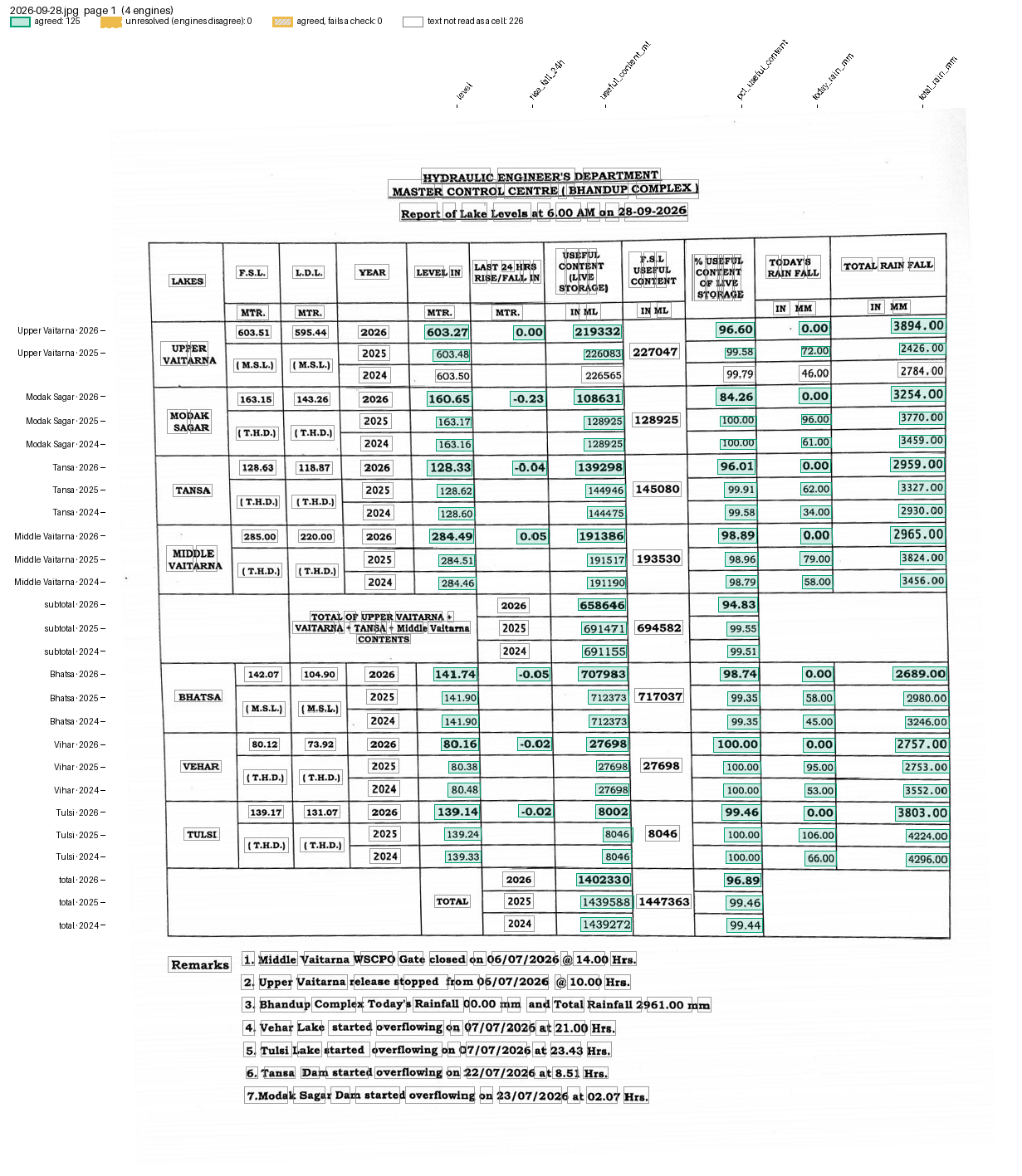
examples/lake_photo/recipe.toml reads the lake-level report that Mumbai’s water department posts each morning as a photo. Only OCR engines can read it. A row is placed by its YEAR cell, which the generic parsers cannot do, so the recipe names a Python parser next to it (comments trimmed):
name = "BMC lake levels"
sample = "../../tests/fixtures/bmc/2026-09-28.jpg"

[engines]
use = ["chandra", "glmocr", "paddleocr", "ocrmac"]
min_unopposed = 2  # two identical reads count where the others read nothing

[parser]
type = "custom"
function = "bmc_lake_report.py:parse"
key = ["lake", "year", "field"]

[output]
layout = "table"
rows = ["lake", "year"]  # one row per lake and year
columns = "field"        # level, useful content, % ...
format = "csv"
pdfexorcist extract tests/fixtures/bmc/2026-07-28.jpg --recipe examples/lake_photo/recipe.toml -o lakes.csv
Reading tests/fixtures/bmc/2026-07-28.jpg with 4 engines (3 must agree), recipe examples/lake_photo/recipe.toml
  chandra    124 readings  0.0s
  glmocr     124 readings  1.8s
  paddleocr  125 readings  24.8s
  ocrmac     110 readings  1.1s

Agreed      125  100.0% of cells
Unresolved    0
lake,year,level,rise_fall_24h,useful_content_ml,pct_useful_content,today_rain_mm,total_rain_mm,report_date
Upper Vaitarna,2026,601.93,0.13,175993.0,77.51,85.0,2432.0,
Upper Vaitarna,2025,602.2,,184926.0,81.45,31.0,1273.0,
Upper Vaitarna,2024,599.27,,97850.0,43.1,19.0,1293.0,
Modak Sagar,2026,163.16,0.0,128925.0,100.0,57.0,2331.0,
...
total,2026,,,1285449.0,88.81,,,
...
,,,,,,,,2026-07-28
parse() in bmc_lake_report.py, in outline (pseudocode):
def parse(pages):
    years = the latest year printed at least 3 times in the YEAR column, and the two before
    for line in all lines:
        find the YEAR cell; a line without one is skipped
        a line with this year's YEAR starts the next block: a lake, the subtotal or the total
        values = the tokens after the YEAR cell, scan specks ("·", "•") and the lake's printed capacity removed
        skip the line if any value is not a number, or the count is not what the block prints,
        or its % is not useful content / capacity
        yield {"lake": block name, "year": year, "field": field, "value": value} per value
A line is never placed by its label, which OCR mangles, and a line with a dropped or extra value yields nothing.
The chandra and glmocr reads were cached from an earlier run. If an engine reads nothing, min_agree does not drop: the others must still reach it. min_unopposed = 2 also accepts a value two engines read identically where the others read nothing, such as the title date, which Chandra and GLM-OCR do not return. The generic parser with --ocr agrees on almost none of this photo’s cells, because the engines split its rows differently.
pdfexorcist show tests/fixtures/bmc/2026-09-28.jpg --recipe examples/lake_photo/recipe.toml -o page.png draws what the recipe reads:
Example: MCCD Table 4
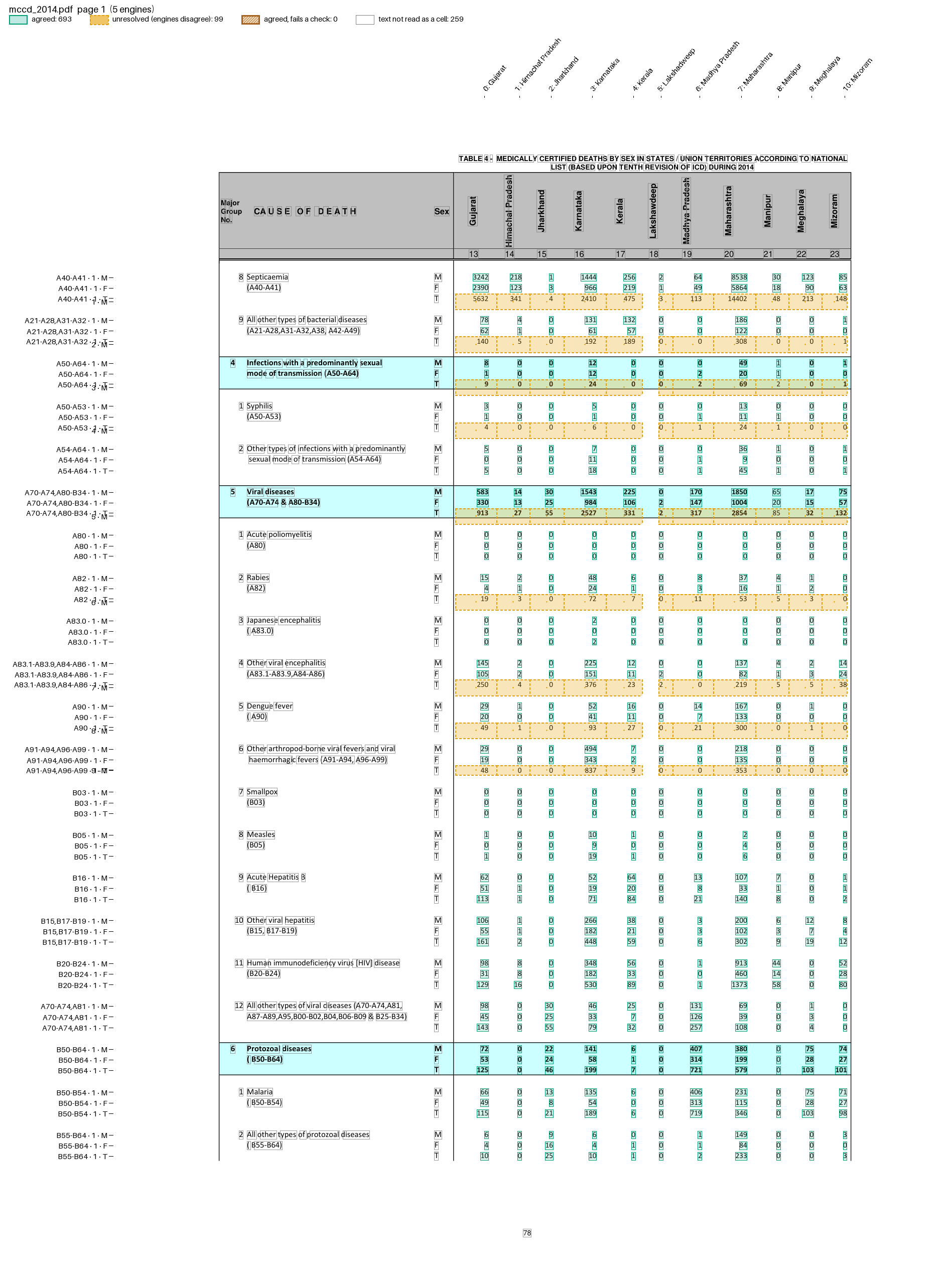
examples/mccd/table4.toml finds its pages by their title, uses a Python parser, and names each column’s State after the vote from rotated headers. See the worked example.
pdfexorcist show tests/fixtures/mccd/mccd_2014.pdf --recipe examples/mccd/table4.toml -o page.png draws what the recipe reads:
Example: MCCD Tables 2, 5 and 9
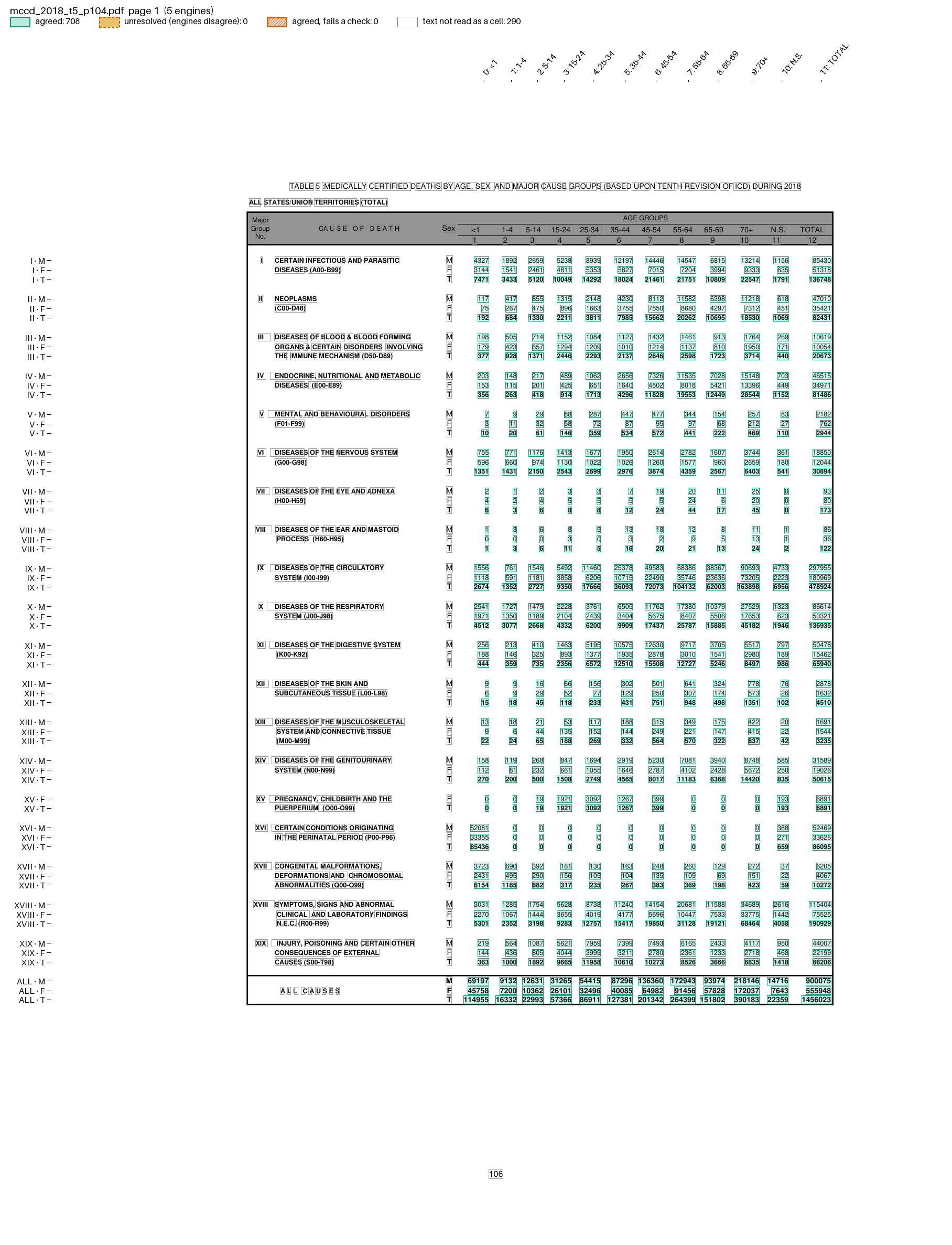
examples/mccd/ reads three more tables of the MCCD report: Table 2 with Table 4’s parser, Tables 5 and 9 with a parser keyed by chapter numeral, columns named from the flat header. See MCCD tables.
pdfexorcist show tests/fixtures/mccd/mccd_2018_t5_p104.pdf --recipe examples/mccd/table5.toml -o page.png draws what the recipe reads:
Example: SRS life tables
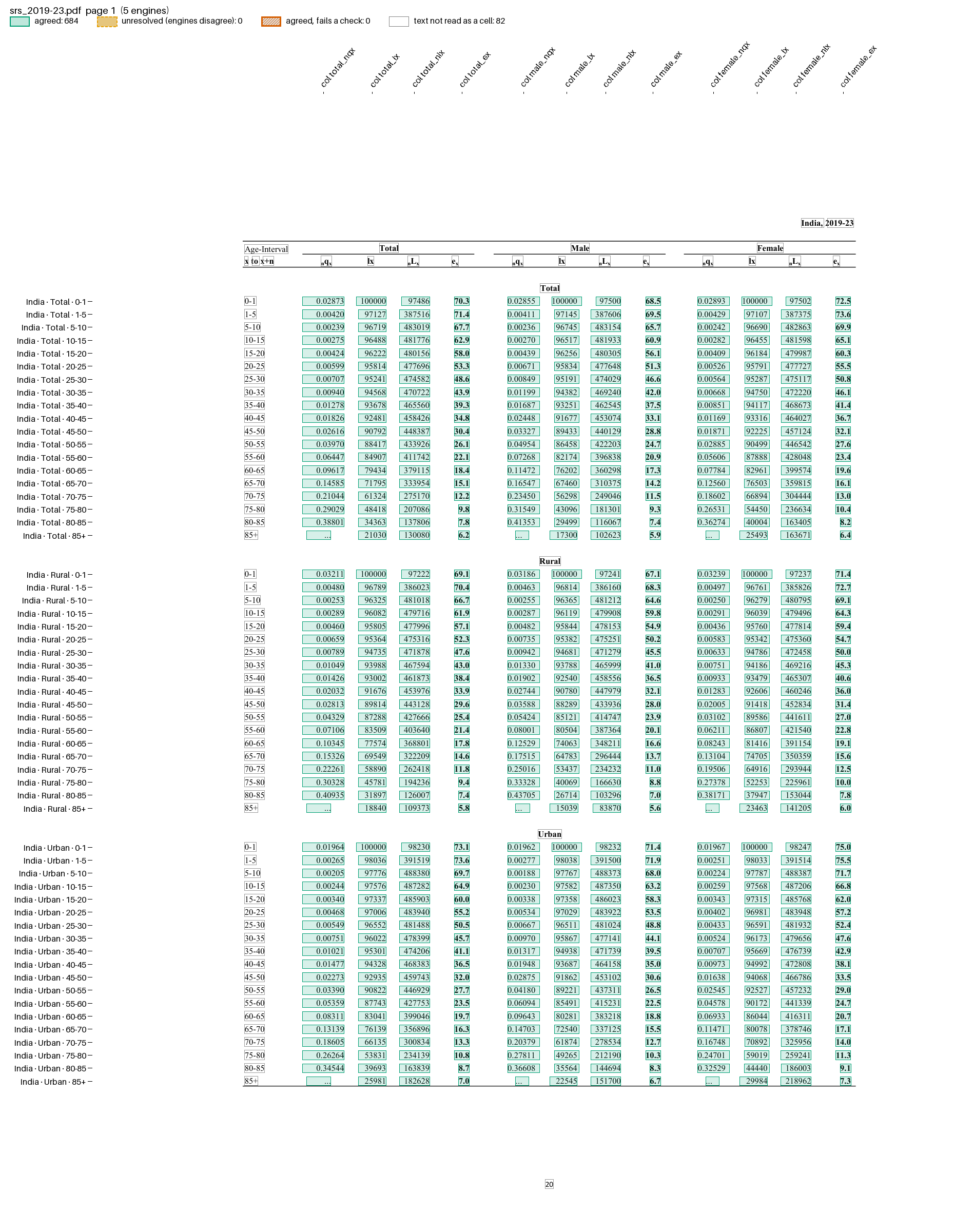
examples/srs_life_table/recipe.toml reads one State a page, keeps the State out of the key so camelot still votes, and checks survivorship in Python. See SRS life tables.
pdfexorcist show tests/fixtures/srs/srs_2019-23.pdf --recipe examples/srs_life_table/recipe.toml -o page.png draws what the recipe reads:
Example: population projections
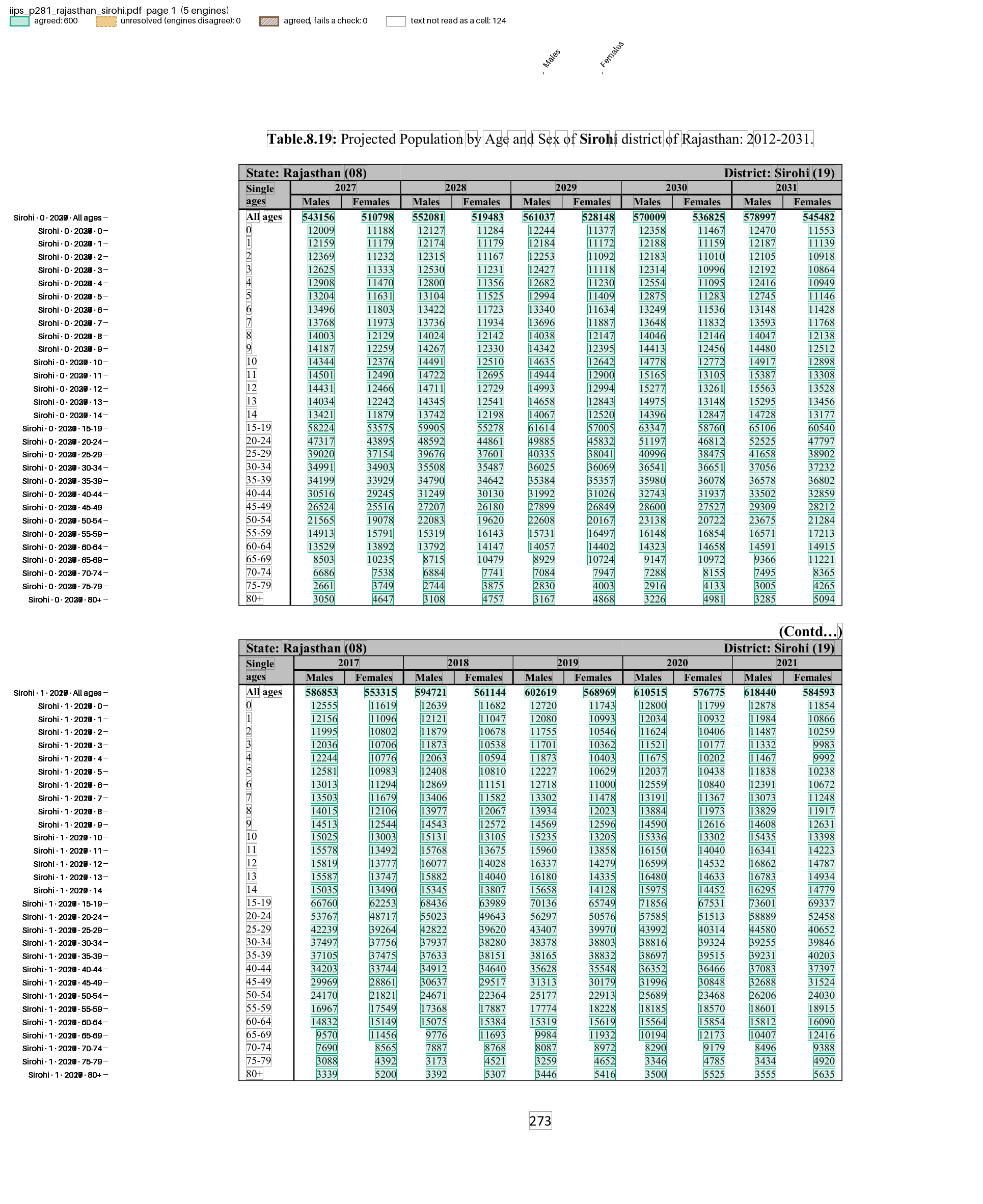
examples/census_iips_district/ and examples/census_mohfw_state/ read two projection reports whose headers are misprinted, with TOML checks that allow for rounding. See Population projections.
pdfexorcist show tests/fixtures/iips/iips_p281_rajasthan_sirohi.pdf --recipe examples/census_iips_district/recipe.toml -o page.png draws what the recipe reads:
Example: CRS State tables
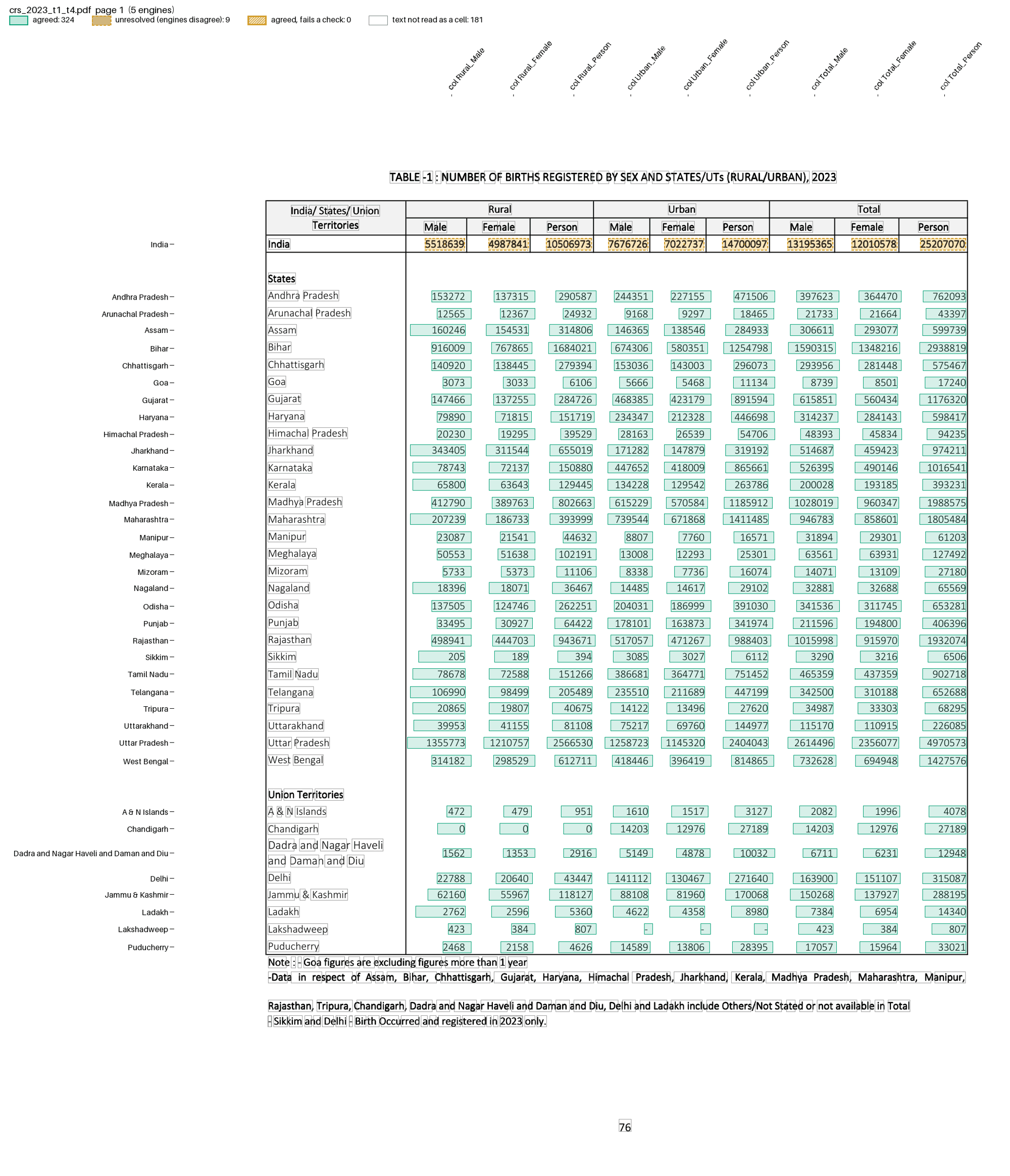
examples/crs_state_tables/recipe.toml finds the table pages with match and names each value’s area and sex for the checks. See CRS State Tables 1-4.
pdfexorcist show tests/fixtures/crs/crs_2023_t1_t4.pdf --recipe examples/crs_state_tables/recipe.toml -o page.png draws what the recipe reads:
Example: NFHS-6 fact sheets
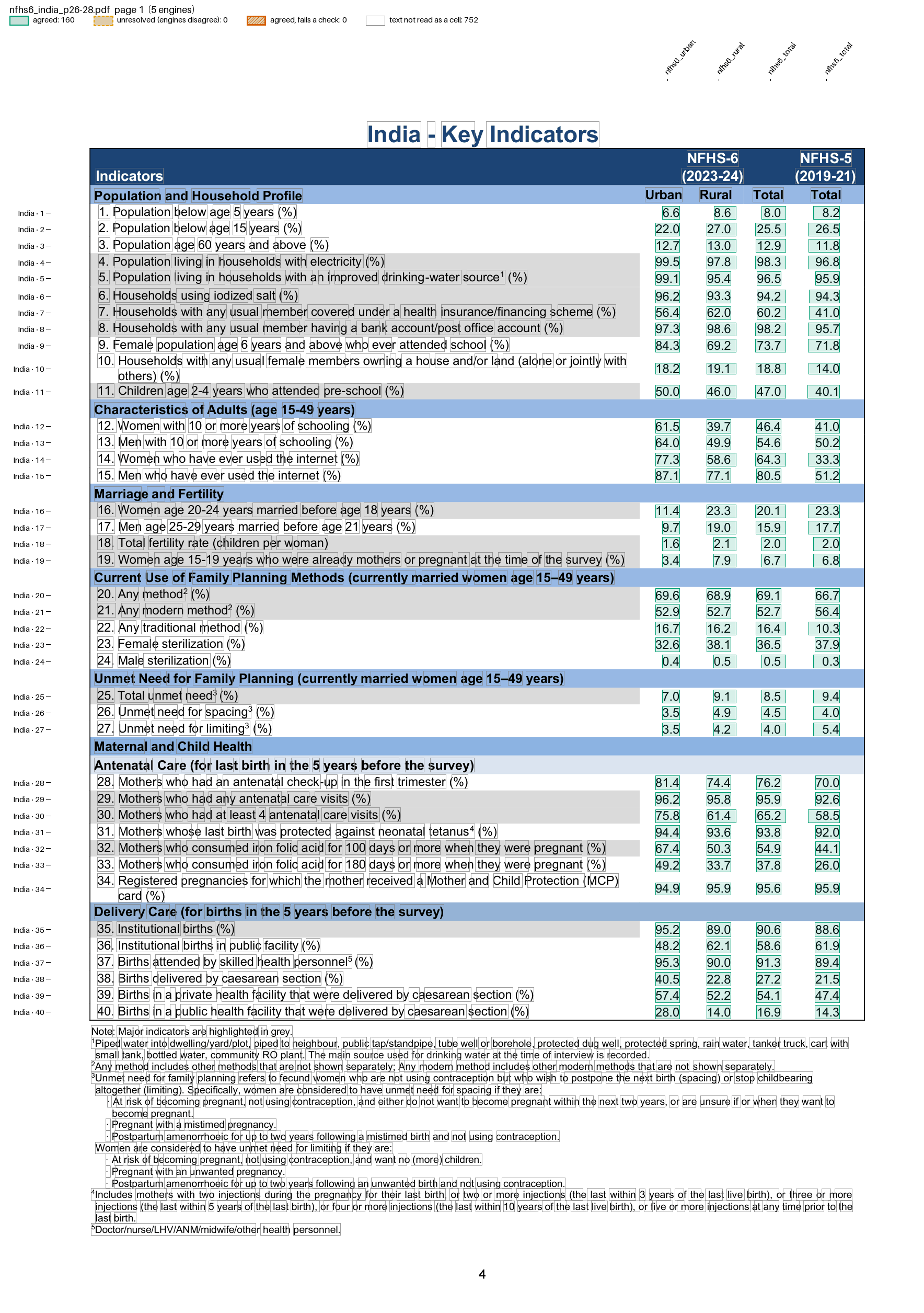
examples/nfhs6/state.toml and examples/nfhs6/district.toml read the NFHS-6 Key Indicators sheets for India, each State and each district with one Python parser: rows named by their printed indicator number, small-sample (45.6) and suppressed * values kept as printed. See the worked example.
pdfexorcist show tests/fixtures/nfhs6_state/nfhs6_india_p26-28.pdf --recipe examples/nfhs6/state.toml -o page.png draws what the recipe reads:
Example: NFHS-5 fact sheets
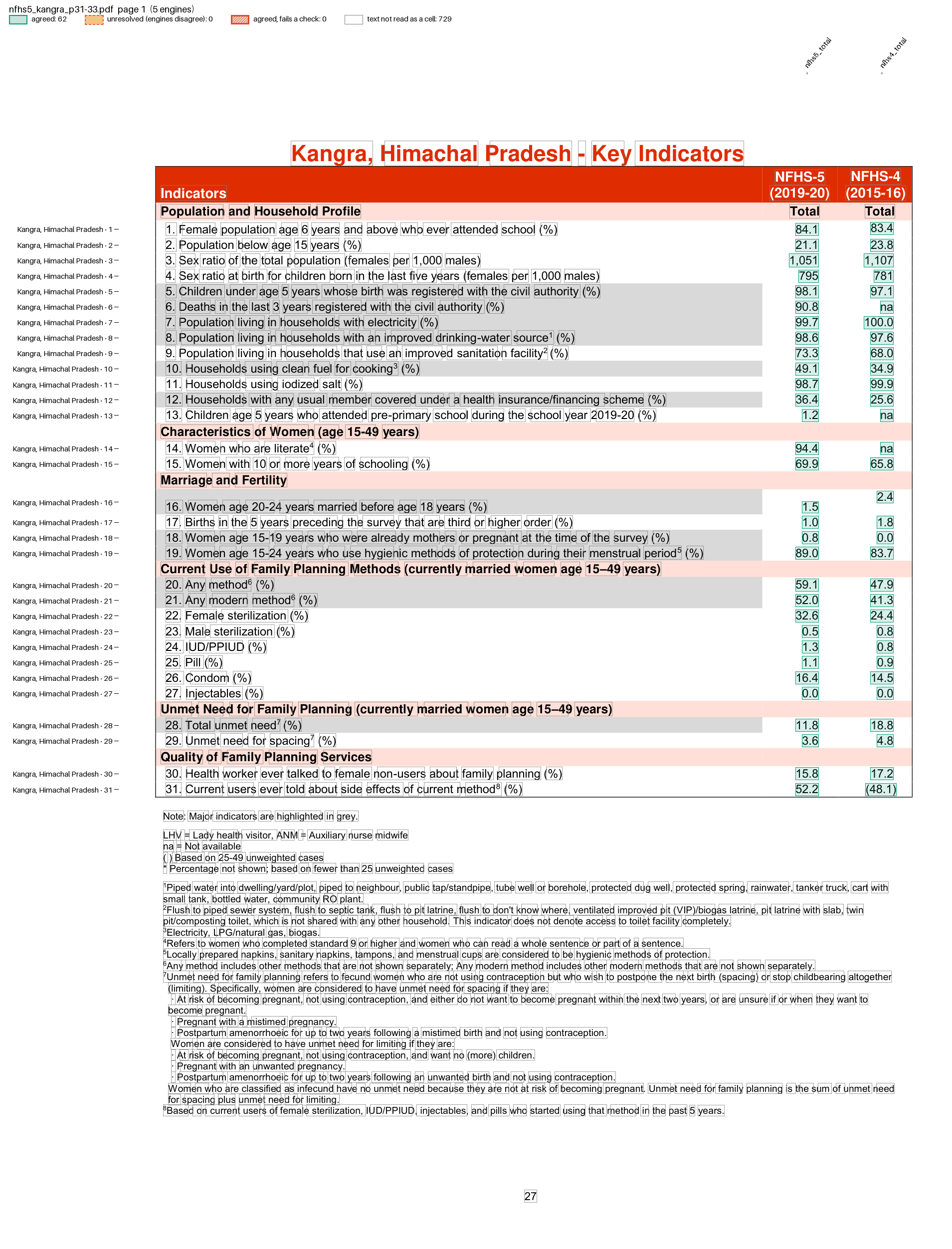
examples/nfhs5/state.toml and examples/nfhs5/district.toml read the NFHS-5 (2019-21) Key Indicators sheets for India, each State and each district, with the NFHS-6 parser adapted to NFHS-5’s layout (na placeholders, districts without an NFHS-4 column). The values are checked against an independent extraction. See the worked example.
pdfexorcist show tests/fixtures/nfhs5_district/nfhs5_kangra_p31-33.pdf --recipe examples/nfhs5/district.toml -o page.png draws what the recipe reads:
Example: Pravah dam storage
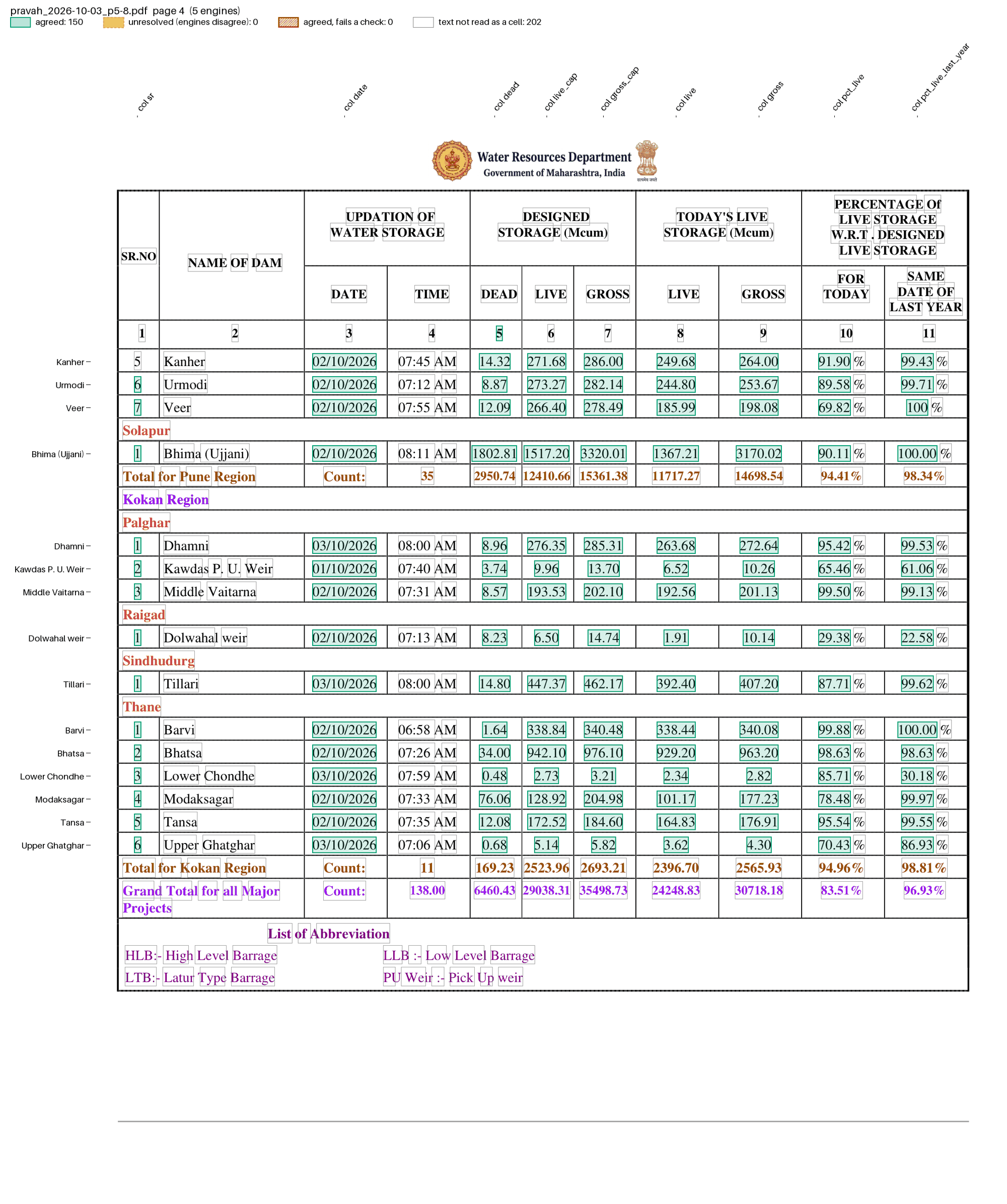
examples/pravah_dams/recipe.toml reads Maharashtra’s daily dam report straight from its link: rows keyed by dam name, wrapped names joined, region and district carried down from their headings, with capacity and % checks. See Pravah dam storage.
pdfexorcist show tests/fixtures/pravah/pravah_2026-10-03_p5-8.pdf --recipe examples/pravah_dams/recipe.toml --page 4 -o page.png draws what the recipe reads:
Example: several tables in one PDF
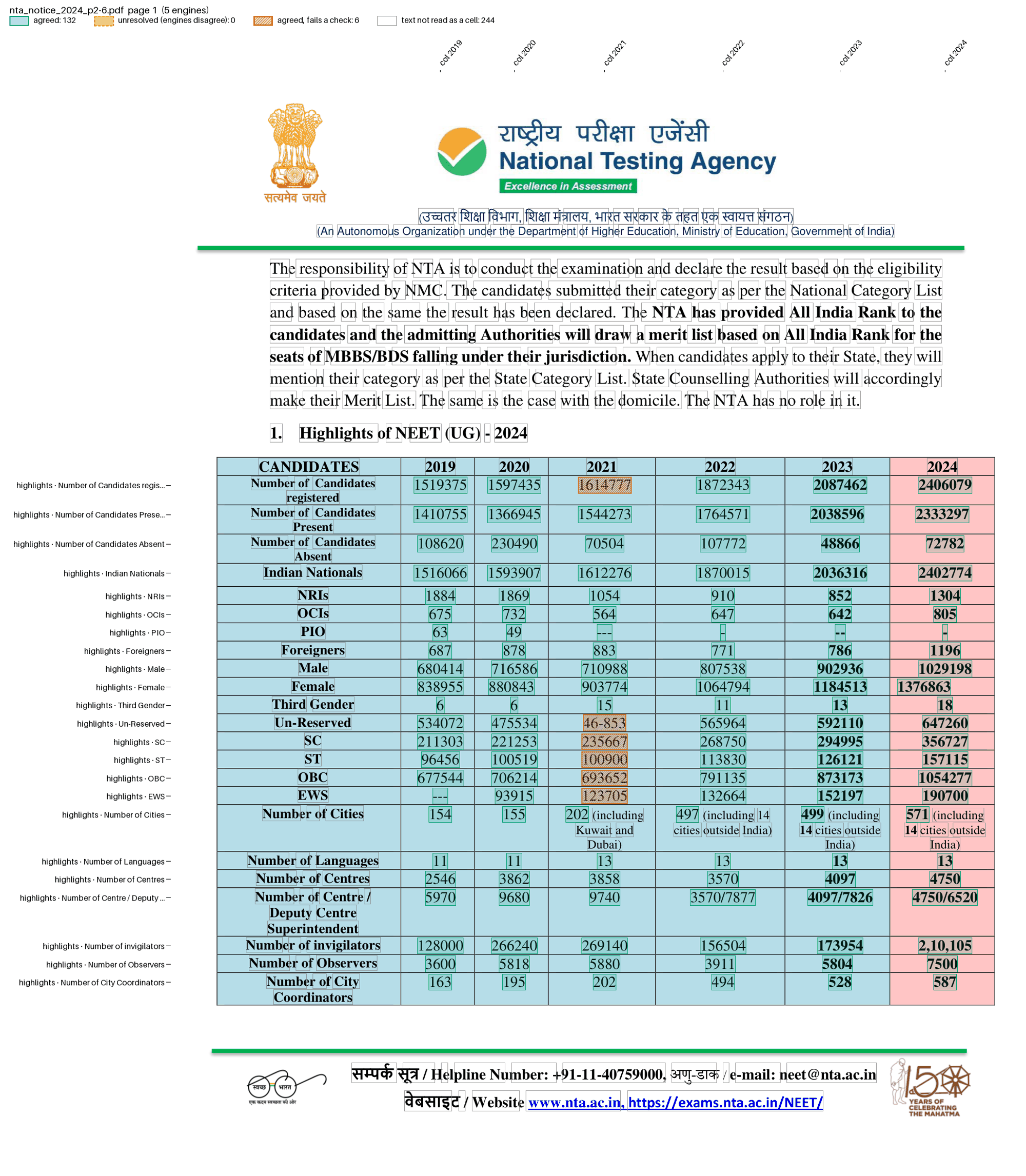
examples/nta_notice/recipe.toml reads the nine tables of the NEET (UG) 2024 result press release with one parser that keys each value by table, row and column; a check catches a misprinted count. See NEET (UG) 2024 press release.
pdfexorcist show tests/fixtures/nta_notice/nta_notice_2024_p2-6.pdf --recipe examples/nta_notice/recipe.toml -o page.png draws what the recipe reads:
Example: a scanned list
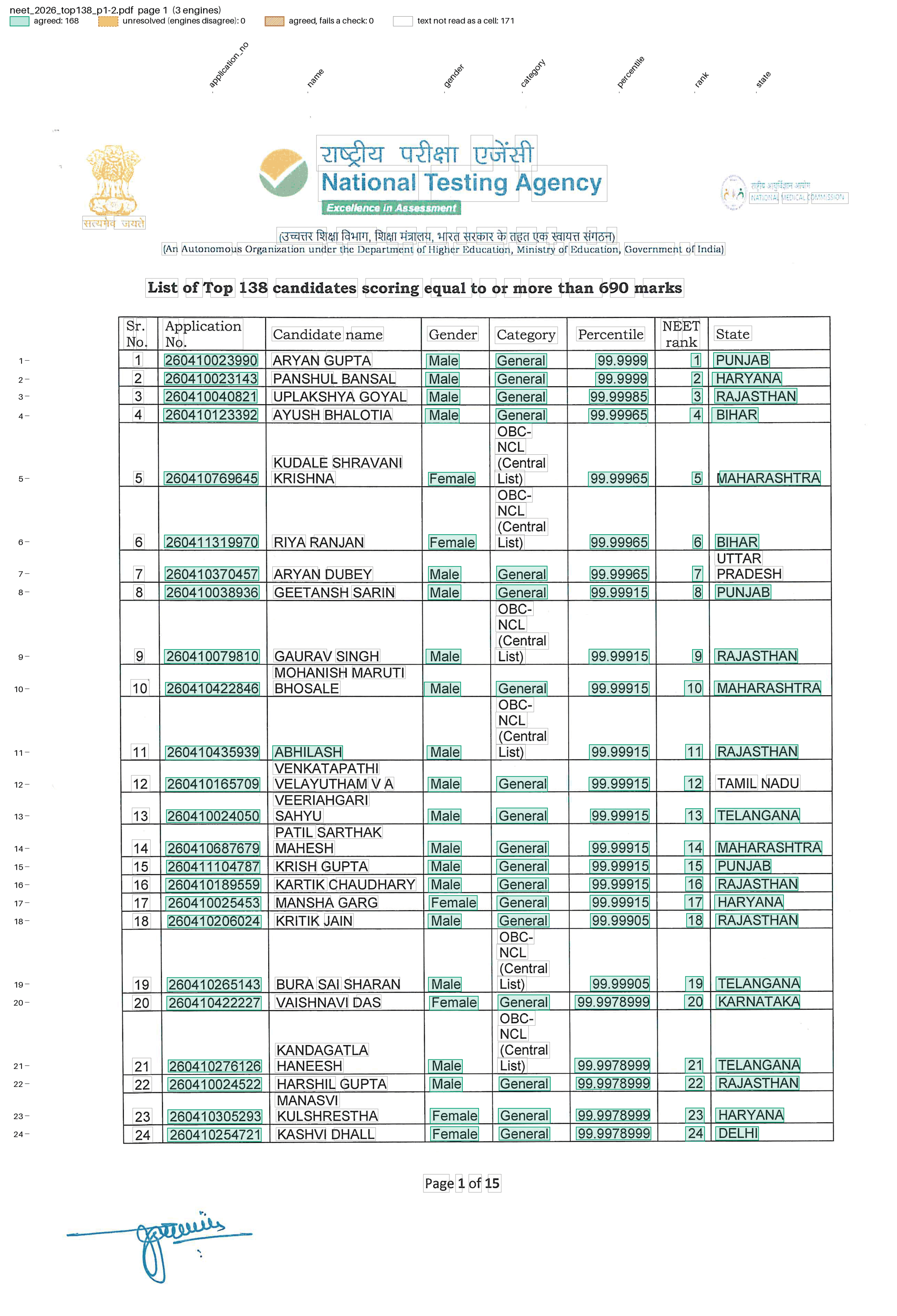
examples/nta_toppers/recipe.toml reads a scanned list of NEET toppers with OCR engines: rows keyed by the printed Sr. No., wrapped names, categories and States joined to their row, and checks that ranks rise and percentiles fall. See NTA NEET toppers.
pdfexorcist show tests/fixtures/nta/neet_2026_top138_p1-2.pdf --recipe examples/nta_toppers/recipe.toml -o page.png draws what the recipe reads:
Example: other settings
Small recipes for the settings the examples above leave at their defaults: the columns parser, column totals, tolerances, select, fit_boxes, min_agree, min_unopposed, families, a [normalize] function, the cells layout and the xlsx, parquet and json formats. See Other recipe settings.
Format reference
Every setting is shown below. A real recipe uses a few, and some exclude others: function and key belong to type = "custom".
name = "Crime in India: State/UT table"
description = "Cases by State/UT"
sample = "report.pdf"            # the file it was made with (for your reference)

[pages]                          # default: every page
select = "3-5, 9"                # page numbers; "21-" runs to the last page
start = 'TABLE\s*4\s*[-:.].*STATES'  # or: from the first page whose text matches,
stop = 'TABLE\s*5'               #   up to (not including) the next page that matches
match = 'All India'              # only pages whose text matches
fit_boxes = false                # default true: widen a page to cover text drawn outside
                                 #   it; false when that text is another page's

[engines]
use = ["pdfplumber", "pymupdf", "pdfium"]  # default: the installed default engines
ocr = false                      # true: add the installed OCR engines (when use is not given)
min_agree = 3                    # default: a strict majority, at least 3 (2 with families or only OCR engines)
min_unopposed = 2                # also accept a value this many read when none read another (off)
families = { ocr_layer = ["pdfplumber", "pymupdf"] }  # engines that are not independent vote once

[normalize]                      # rewrite every value before the vote
remove_commas = true             # "1,020" -> "1020"
remove_footnote_marks = true     # "490*" -> "490" (a lone "*" placeholder stays)
raised_dots = true               # "65·3" -> "65.3"
minus_signs = true               # "−4" -> "-4"
function = "clean.py:fix"        # your own: value -> new value, or None to drop it

[parser]
type = "rows"                    # "rows": a label, then values in reading order (default)
                                 # "columns": values placed by their position (scans, photos, blank cells)
                                 # "custom": your own function (below)
min_values = 2                   # skip lines with fewer values (titles, footnotes)
tolerance = 0.45                 # "columns" only: how far from a column a value may sit
function = "my_parser.py:parse"  # "custom": pages -> one dict per value
key = ["page", "code", "sex", "col"]  # "custom": the columns that identify a cell

[[checks]]                       # one [[checks]] block per rule; repeat it for more
column = "label"                 # the column naming the total and its parts
rule = "TOTAL ALL INDIA = TOTAL STATE(S) + TOTAL UT(S)"
by = ["page", "col"]             # checked separately within each of these
where = "col <= 2"               # optional: only the cells this pandas query keeps
tolerance = 0.01                 # optional: allowed relative gap (1%)
abs_tolerance = 0.15             # optional: allowed absolute gap (rounded numbers)
missing = "fail"                 # optional: a listed part that is missing fails (default "skip")
name = "States + UTs = India"    # optional: the name written in the failed column

[[checks]]                       # the same rule as total and parts, for a total column:
column = "col"
total = 0                        #   the total's name (text or a number)
parts = [3, 6]                   #   its parts; leave out for "every other"
op = "="                         #   =, >= or <= (default =); not used with rule
value = "value"                  #   the column holding the numbers (default "value")

[[checks]]
function = "my_checks.py:rules"  # your own check, a list of checks, or a function returning them

[postprocess]
function = "my_parser.py:name_states"  # after the vote: (cells, pdf) -> cells, e.g. add a State column

[output]
layout = "table"                 # "table": a grid of agreed values (default); "cells": one row per cell
columns = "col"                  # the column spread across the grid (default "col")
rows = ["code", "sex"]           # the columns that name a grid row (default: the rest of the key)
format = "csv"                   # csv, xlsx, parquet or json
Pages
Patterns are regular expressions, case-insensitive, and . also matches a line break. Use single quotes so backslashes stay as typed. select limits where start looks: select = "21-" skips a contents page naming the same table.
Checks
rule is the total, then =, >= or <=, then its parts joined by +:
Rule |
Meaning |
|---|---|
|
The total equals its parts. |
|
The total may exceed its parts. |
|
The total equals every other row of the group. |
The generic parsers name cells by page, row, col (the value’s place in its line, from 0) and label (the line’s text). A total row is column = "label". A total column is column = "col" with by = ["page", "row"].
total, parts and op say the same as rule, and suit names that are numbers, like the col of a total column: total = 0 and parts = [3, 6] is rule = "0 = 3 + 6". With missing = "fail", a group whose total is there but a listed part is not fails; the default skips it.
Values that break a rule are kept, named in the failed column and listed for review, and the run exits with code 1. A rule whose total or parts never appear is reported, so a typo cannot pass as “all checks passed”.
Your own Python
function = "file.py:name" loads name from a .py file in the recipe’s folder or below it. That file may import its neighbours. The functions have the library’s signatures:
Setting |
Signature |
|---|---|
|
|
|
|
|
Agreed cells |
|
|
Page numbers in the output are the original ones.
Where each setting is used
Every example recipe runs on a fixture in tests/fixtures/.
Setting |
Example |
|---|---|
|
|
|
|
|
|
|
|
|
|
|
|
|
|
|
|
|
|
|
|
|
|
|
|
|
every gallery document except Crime in India |
|
|
|
|
|
|
|
|
|
|
|
|
|
|
|
|
|
|
|
|
|
Warning
A recipe that names a .py file runs that code. Only use recipes you trust. recipe show explains a recipe without running it.