NCVBDC line charts
The National Center for Vector Borne Diseases Control (NCVBDC) publishes a Monthly Malaria Situation report for each category of States/UTs. The August 2026 Category III report has 13 pages.
Two pages give four line charts for Category III and for each of its States: Mizoram, Odisha and Tripura. The four charts show Tested, Positive, TPR (positive cases for each 100 tests) and Pf (Plasmodium falciparum cases) by month. Each chart has three series: the current year, the last year, and the average of the last three years.
The charts do not show the values. Only the positions of the lines give the numbers.
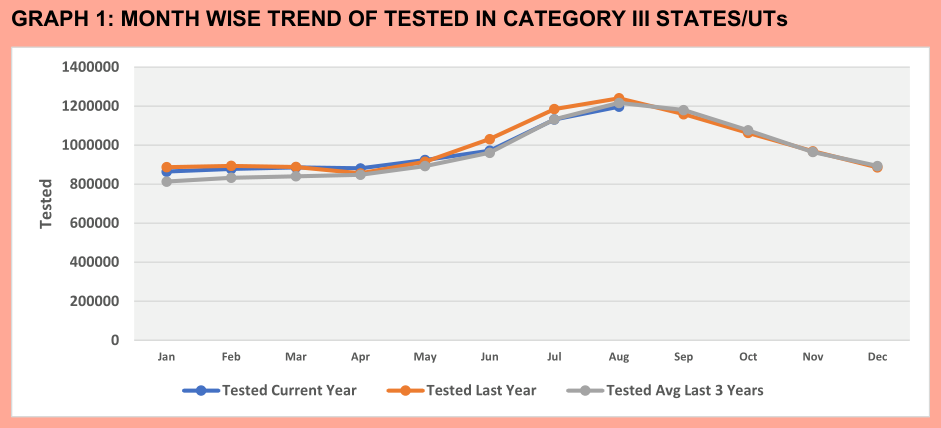
The fixture contains the eight pages with charts (pages 3-4 and 7-12). It is in tests/fixtures/ncvbdc/. The example uses no recipe. The charts command reads the charts.
Run it
pdfexorcist charts https://ncvbdc.mohfw.gov.in/WriteReadData/l892s/36403234541790767725.pdf -o charts.csv
On the fixture:
pdfexorcist charts tests/fixtures/ncvbdc/malaria_2026_08_cat3_charts.pdf -o charts.csv
Wrote 512 points from 16 charts to charts.csv.
page,chart,title,series,category,value,pm,status
1,1,GRAPH 1: MONTH WISE TREND OF TESTED IN CATEGORY III STATES/UTs,Tested Current Year,Jan,865002.0,1110.787589579386,estimated
1,1,GRAPH 1: MONTH WISE TREND OF TESTED IN CATEGORY III STATES/UTs,Tested Current Year,Feb,878335.0,1110.787589579386,estimated
...
4,1,GRAPH 3: MONTH WISE TREND OF TPR IN MIZORAM,TPR Current Year,Jan,1.361,0.007171776153575996,estimated
...
The current-year series stops at August, the month of the report. The other two series stop at December.
How pdfexorcist reads the values
Excel draws each series as a line through its points, in the color of the series. The legend gives the name of each color.
The labels on the y axis give the scale. pdfexorcist moves each label to its gridline and finds the straight line through the labels. The position of a vertex on this scale gives the value of the point. The nearest month label gives its category.
A value from a position is an approximate value. pm gives the maximum error of the value. It is the change in value for 0.12 pt. In this report, the vertices of a line are a maximum of 0.12 pt from its markers. Each value has the status estimated.
The engines do not vote on these values. pymupdf, pdfplumber and pdfium read the same coordinates of the paths. Thus, an error in the data from one engine is also in the data from the other two engines.
Some charts for small areas show the axis labels 0 0 0 0 0 1 1 1 1 1. Excel rounded the values 0, 0.1 … 0.9 to integers. pdfexorcist finds the one Excel axis that gives these labels when Excel rounds them.
The step of this axis is 1, 2, 2.5 or 5 times a power of 10, and its first value is 0. If no axis gives the labels, or if more than one axis gives them, pdfexorcist does not read the chart. The output gives the chart and the cause.
pdfexorcist also does not read weekly lines below month labels.
The checks
tests/test_charts.py compares the readings with the report:
For each month of the current year and the last year, the TPR chart gives Positive / Tested × 100 from the other two charts. The difference is less than the
pmlimits. The test does not use the average series, because its TPR is an average of three TPR values.Positive / Tested × 100 for the year to date agrees with the TPR in the text below each TPR chart: Category III 0.62, Mizoram 3.44, Odisha 0.54 and Tripura 0.63. The difference is less than the
pmlimit plus 0.005, because the text gives two digits after the decimal point.
In the browser
The site shows this report as an example. To read a different PDF in the same mode, select What to read: Line charts.
The page shows one table for each chart. Each table has a row for each series and a column for each month. The page also shows the pm of each chart. Its CSV file is the same as the CSV file from the command line.
Charts in pictures
Some reports paste each chart as a picture. The December 2020 Category 1 report has 37 pages. Each value is printed in a box of the series color. A picture has no text layer, so OCR engines must read the values.
The shipped recipe ncvbdc_charts reads these charts. The fixture contains pages 3-4 (Category 1) and 7-8 (Chandigarh). It is in tests/fixtures/ncvbdc/.
name = "NCVBDC monthly malaria charts"

# three OCR engines (Apple Vision, tesseract, Indra); two must agree
[engines]
min_agree = 2

[charts]
kind = "image"
title = 'GRAPH \d+: MONTH WISE TREND'
names = ["Current Year", "Average 3 years"]

[[checks]]
function = "charts_checks.py:tpr"

[[checks]]
function = "charts_checks.py:pf_within_tpc"
pdfexorcist charts tests/fixtures/ncvbdc/mmis_cat1_2020-12_p3-4_7-8.pdf --recipe ncvbdc_charts -o charts.csv
Wrote 128 points from 7 charts (90 verified, 38 unresolved) to charts.csv.
10 values failed a check: see the failed column.
page,chart,title,series,category,value,status,votes,line_value,failed
1,1,GRAPH 1: MONTH WISE TREND OF BSE IN CATEGORY- 1 STATES,BSE Current Year,Jan,928282.0,verified,928282×3,926824.5598569321,
1,1,GRAPH 1: MONTH WISE TREND OF BSE IN CATEGORY- 1 STATES,BSE Current Year,Feb,,unresolved,111164×1 | 1111648×1,1094153.9499094852,
...
1,2,GRAPH 2: MONTH WISE TREND OF TPC IN CATEGORY- 1 STATES,TPC Average 3 years,Sep,578.0,verified,578×3,1000.3602466414178,value off its line
...
How pdfexorcist reads a chart picture
One OCR engine reads the words of the picture: the title, the category labels, the y-axis labels and the legend.
In each legend row, a horizontal run of one color is a line sample. The words after it are the name of its series. The recipe gives the two names. Thus, an OCR reading such as “TPCAverage 3 years” gets the nearest name.
A solid block of a series color, with the size of a value box, is a value box. Sometimes the boxes of a series do not have the color of its line. Then that series gets the most frequent fill that no other series has.
Each OCR engine reads all the value boxes. The engines vote on each number. In this recipe, two of the three engines must agree.
Each number gets the nearest category label, in order from left to right.
pdfexorcist also finds the series line at each category, and gets its value from the y axis. This value is in the
line_valuecolumn. If a number is far from its line, thefailedcolumn shows “value off its line”.
The status of a number is verified (the engines agree) or unresolved. The votes column shows what each engine read.
What the checks found
In each TPC chart, the boxes of the 3-year average do not agree with its line. For September in Category 1, the box shows 578, but the line is at 1000. The line check marks these values. The boxes of the current year agree with their line.
The TPR check calculates TPC / BSE × 100 for each month and compares it with the TPR chart. The PF check makes sure that PF is not more than TPC. A value that fails a check gives the exit code 1.
The browser cannot read chart pictures, because it has no OCR engines. Use the command line.